Skip to content

This article explains how to delete a Loan Car Booking that was made by mistake or is no longer needed. Deleting it removes the booking from the Loan Car Diary and frees the Loan Vehicle for that time, without needing to contact support.
Please note: The Loan Car system is available on Gold and Platinum subscription plans.
You can delete a Loan Car Booking that has not started yet. Once the car has gone out to the Customer, or the booking is on a Job Card that has been processed the booking can no longer be deleted.
Deleting a Loan Car Booking
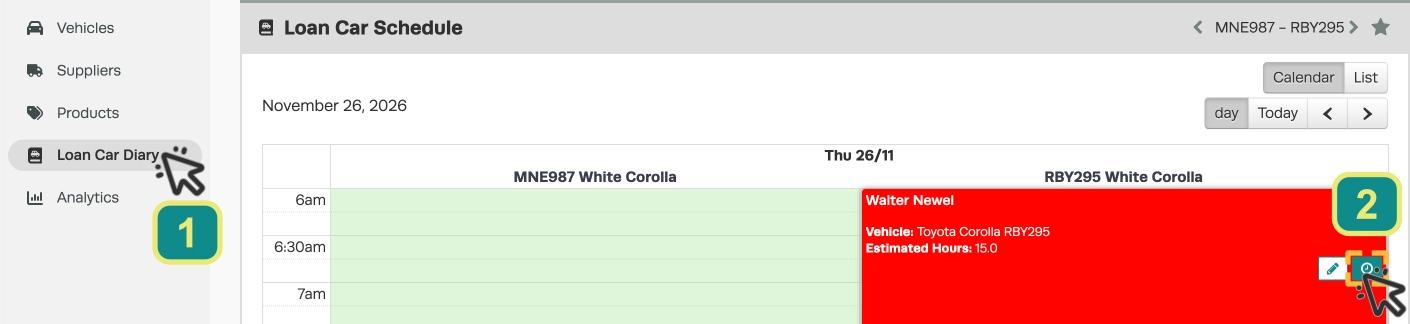
- Click Loan Car Diary (1) in the left-hand menu, find the booking, and click its Clock icon (2).
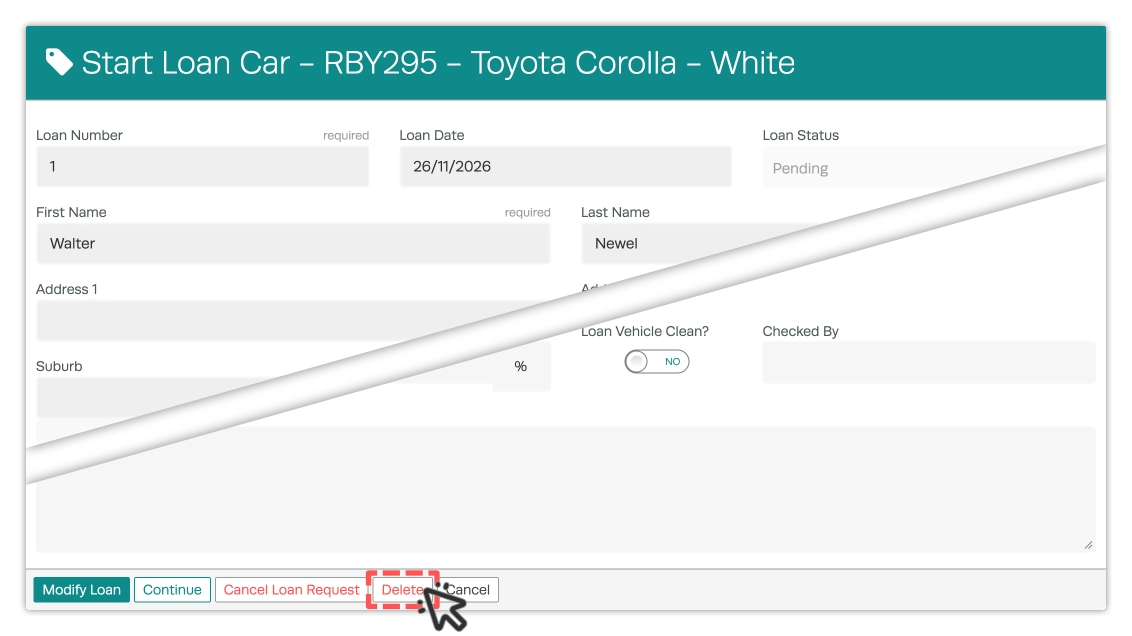
- In the Start Loan Car window, click Delete at the bottom of the window.
- When asked "Are you sure you want to delete this loan?", click Yes.
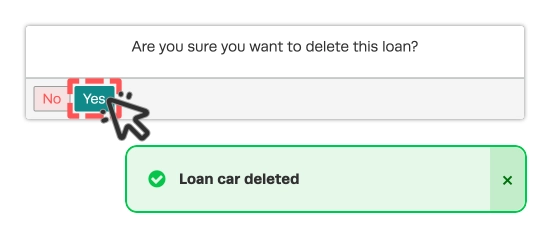
The message "Loan Car Deleted" appears and you are taken back to the Loan Car Diary. The booking is gone and the Loan Vehicle is free for that time again.
Delete vs Cancel Loan Request
Both buttons sit at the bottom of the Start Loan Car window, and they do different things.
- Delete removes the booking completely, as if it was never made. Use it for a booking made in error.
- Cancel Loan Request keeps the booking on record as cancelled. Use it when the loan was genuinely arranged and then called off, and you want a record of that.
Good to Know
- The Loan Vehicle can be booked again for the same time straight away.
- If the booking was linked to a Job Card or a customer Booking, that Job Card or Booking stays open and saves as normal. Only the loan car link is removed.
- Delete only appears on a booking that has not started. A loan car that is out must be returned first, and a completed loan stays in your history.
- Bookings are deleted one at a time from each booking's own Start Loan Car window.
Frequently Asked Questions
Why can't I see a Delete button on my Loan Car Booking?
The booking has already started, so the car is out with the Customer. Return the loan car using the Car icon on the booking. A started or completed loan stays on record and cannot be deleted.
I clicked Delete and saw "Only a loan that has not started can be deleted, and not once its job card is processed". What does that mean?
The booking is linked to a Job Card that has already been processed, so the loan stays on record with that Job Card and nothing is deleted.
Will deleting a Loan Car Booking change the Job Card or Booking it was linked to?
No. The Job Card or Booking stays exactly as it was, apart from no longer showing the loan car. You can open and save it as normal.
Can I delete several Loan Car Bookings at once?
No. Open each booking with its Clock icon and delete it from its own Start Loan Car window.
Can I delete a booking from the Modify Loan window?
No. Delete is only in the Start Loan Car window, which opens from the booking's Clock icon.