 Skip to content
The Country Code setting changes how Workshop Software behaves, from address states and phone formats to country-specific options such as WOF reminders for New Zealand. This article shows you where to change it.
Workshop Software is designed to work in any country in the world.
Based upon the country settings that you choose, the system will behave differently. For example, if you choose USA as the Country Code, then all the US States will be available in the address details and phone numbers will be formatted according to USA phone formats. If you choose New Zealand, there will be a WOF reminder option and setting in the vehicle section. There are many more examples of specific country settings.
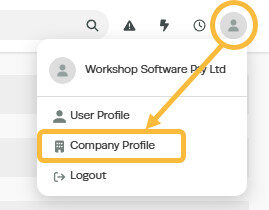
1. Click on the 'Person' icon at the top right of the page and then click on ‘Company Profile’ from the dropdown box;
2. Click on the dropdown box under 'Country Code' and select the correct country from the list;

3. Click 'Save'

Related Articles
- Change the language settings in Workshop Software
- Access and change your subscription details
- How to change your password
