Skip to content
Labour Products are important in Workshop Software. They are used to store Booking Diary event times with or without an allocated Mechanic and as the record a Mechanic's time clocked onto a Job is stored against.
In addition to a default Labour Product and/or Service Labour Product to track variable work hours any discreet service you offer your clients should be created as a Labour product, examples would include safety checks, tyre balances and wheel alignments.
Creating a New Labour Product
Labour products may be created in your Product Page or from a within a Product List in a Customer Invoice, Supplier Stock Order or Supplier Invoice.
Creating a Labour Product in the Product Page
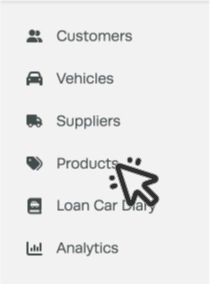
- On the left hand sidebar, click on Products.
- Click the + next to the Product filter bar.

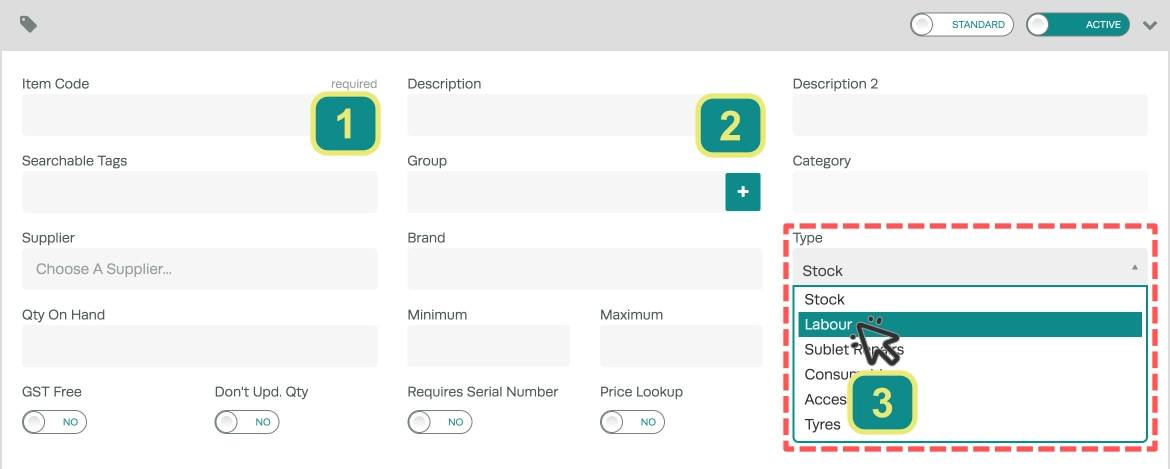
- Enter an Item Code (1), Description (2) and set the Type (3) to "Labour".
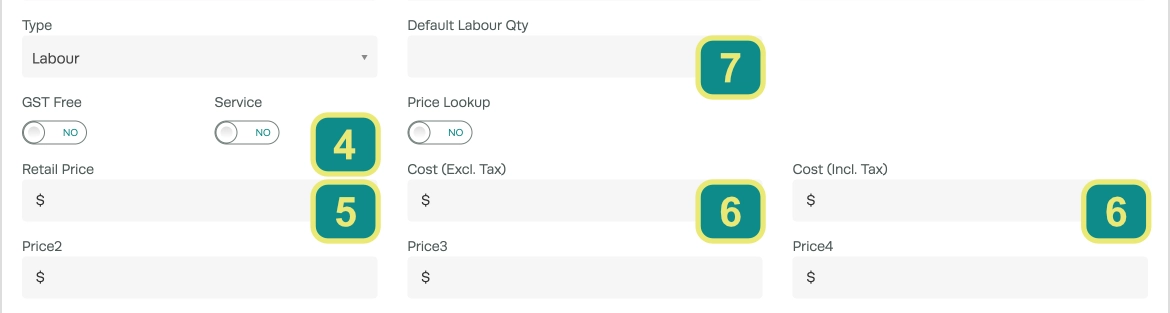
- You may also choose if the Product is defined as a Service (4) i.e. a logbook or simple maintenance visit.
Please Note: If the Service toggle is enabled, when an Invoice containing this Product is Processed the Vehicle's Last Service date field is set to the day of processing and the Next Service date field to the number of months into the future defined by the Service Interval field of the Vehicle, a default values may be set in your Company Settings.
- A Retail Price (5) should be chosen, the Cost (6) price may be left at $0 as Labour Products calculate their cost based upon the Cost Per Hour assigned to a mechanic multiplied by the Mechanic Time's logged on the Invoice.
Please Note: The Cost Price will be overridden when Mechanic Time is Logged.
- If a Default Labour Qty (7) is entered, when the Product is added to an Invoice, the Qty for the Product in the invoice will be set to this value.
All other Product fields are explained in our Add a Product article.