 Skip to content
If your invoices are not syncing to MYOB, the Event Log in Workshop Software will tell you why. This article shows you how to check it and how to read the error messages.
The key to finding out why your invoices are not syncing to MYOB is to check the Event Log in Workshop Software. How to check the Event Log-
- Click on Reports on the left hand menu bar in Workshop Software
-
- Select Business Reports
-
- Select Log reports
-
- Select Event Report
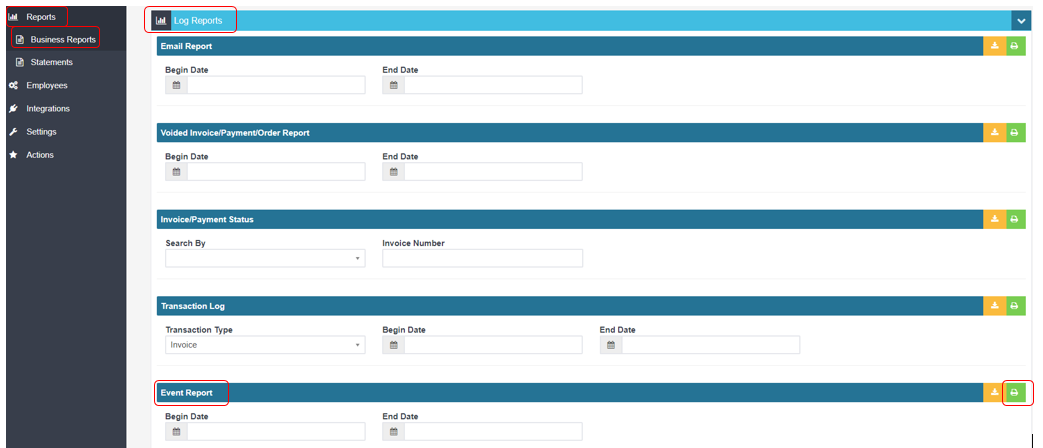 This will show you a log of all the errors for your invoices. This would be the FIRST step that we suggest that you do. Below is a sample of what the error messages will look like
  The key parts you need to be looking for are the following: 1) The invoice number is located in the top right hand corner This defines which invoice the error is referring to. 2) The error message This error message will let you know what the issue is 3) The reason for the error
The highlighted areas in the screenshot above are where you will find this specific information. For guides on the specific errors, please go to the Articles below:
"InsufficientItemQuantity" - Insufficient item quantity to complete transaction "Access Denied" "IncomeAccountFreight Linked Account is required if charging freight" "UnitPrice must be a positive number" "FieldNotFound" "Maximum allowed characters for CompanyName is 50"
If there is no article for the error, please contact the Support Team on support@workshopsoftware.com
The key parts you need to be looking for are the following: 1) The invoice number is located in the top right hand corner This defines which invoice the error is referring to. 2) The error message This error message will let you know what the issue is 3) The reason for the error
The highlighted areas in the screenshot above are where you will find this specific information. For guides on the specific errors, please go to the Articles below:
"InsufficientItemQuantity" - Insufficient item quantity to complete transaction "Access Denied" "IncomeAccountFreight Linked Account is required if charging freight" "UnitPrice must be a positive number" "FieldNotFound" "Maximum allowed characters for CompanyName is 50"
If there is no article for the error, please contact the Support Team on support@workshopsoftware.com
Good to Know
- If you have an accounting integration enabled, this change will sync to your accounting system on the next sync cycle.
- If you experience any issues during setup, contact the Workshop Software support team for assistance.
- Keep your integration credentials secure. Do not share API keys or passwords with anyone outside your organisation.
