 Skip to content
This article explains how to switch on Two Way SMS, what it costs, and how long it takes before you can text your Customers from your own dedicated number.
Activation is available for a Workshop's Admin accounts in Australia, New Zealand and the United Kingdom.
Please note: Two Way SMS is a monthly add-on to your subscription. There is no setup fee. The price is shown on the activation page before you confirm.
Before You Start
You can activate Two Way SMS when all of these are true:
- Your Workshop Software subscription is active, Two Way SMS cannot be activated during a free trial.
- Your company is in Australia, New Zealand, the United Kingdom or Northern Ireland.
- Your company profile has a Company Name and a reply-to Email Address.
- You have SMS credits available.
- You are logged in as an admin user.
Activating Two Way SMS
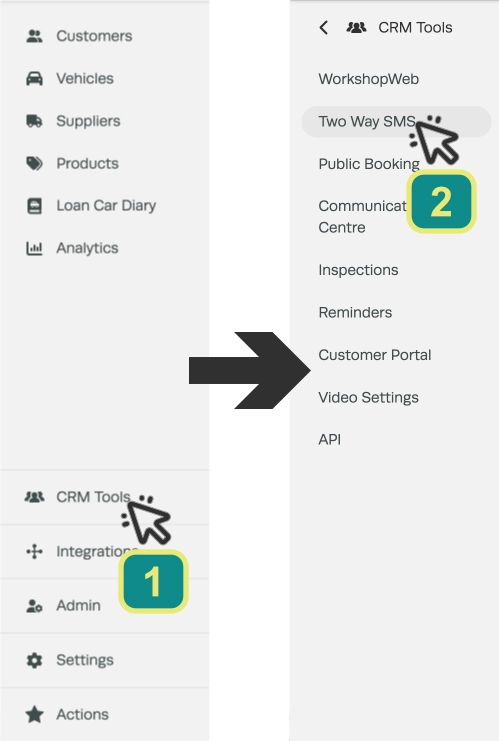
- Click CRM Tools (1) in the left hand sidebar menu, then select Two Way SMS (2).
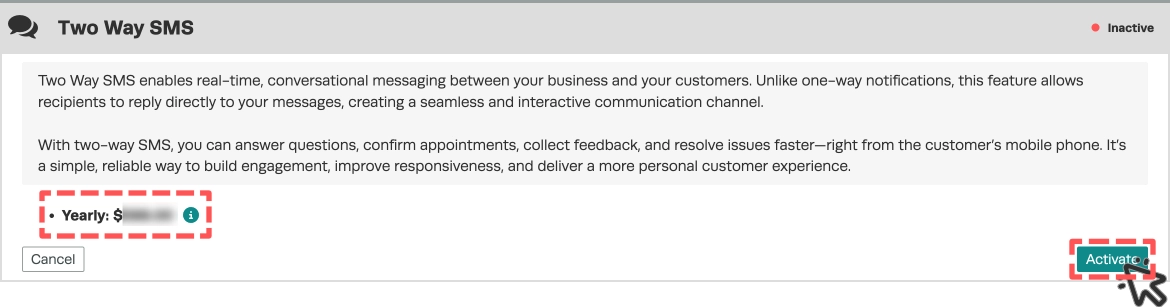
- Check the price line under the description which shows your billing period and the add-on price, then click Activate.
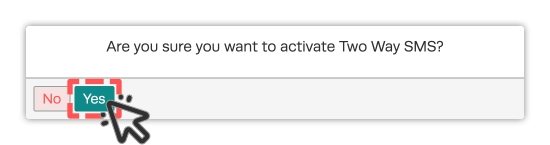
- Click Yes on the message "Are you sure you want to activate Two Way SMS?".
What Happens Next
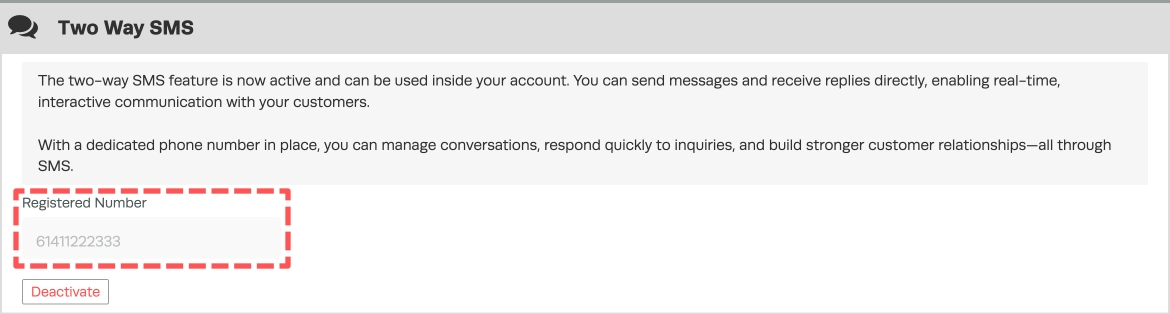
In Australia your number is set up straight away, within a few seconds you see "Two Way SMS Activated", and the page shows your SMS only number under Registered Number.
You will also receive an email containing the number with the subject "Workshop Software - Two-Way SMS Number Activation".
In New Zealand and the United Kingdom our team requests your number from our SMS provider. Until it is ready, the page says the feature is awaiting activation. This can take up to 48 hours, and you receive the same email with your number when it is ready.
If the automatic setup in Australia cannot finish for any reason your request goes to our team in the same way and you will receive your number with 48 hours.
Good to Know
- Your Two Way SMS number is a dedicated number for your business. It is for SMS only, so calls cannot be made or received on it.
- Replies from your Customers appear in your Workshop Software messages.
- Ask your Customers to save the number in their phones so they recognise your messages.
- To stop using Two Way SMS, open the same page, click Deactivate and then Yes. Your number is removed from your account.
Frequently Asked Questions
How long does activation take?
In Australia, a few seconds, In New Zealand and the United Kingdom up to 48 hours.
Is there a setup fee?
No. You pay the monthly or yearly add-on price shown on the activation page and nothing else.
Why does the page say Two Way SMS is awaiting activation?
Your number is still being set up by our team. This is normal in New Zealand and the United Kingdom, if it has been more than 48 hours please contact support@workshopsoftware.com.
I saw "Company reply to email is required to activate Workshop SMS". What do I do?
Add a reply-to email address to your company profile, then activate again.
I saw a message saying there are no SMS available to send. What do I do?
Before activation your account must have available SMS credits. Buy more SMS credits, then contact support@workshopsoftware.com before you try again so we can check your subscription.
If I deactivate and activate again, will I keep the same number?
No. Deactivating removes your number, and activating again gives you a new one.
