 Skip to content
Admin users can switch a Workshop Software subscription from monthly to yearly from the Dashboard. This article shows you where to do it and what happens to your billing.
If you are looking to save on your yearly subscription fees you can easily change your subscription from the Dashboard, Workshop Software has the option to go yearly saving you up to $240 over 12 months. Please note you need to be "admin" user to be able to change your subscription level.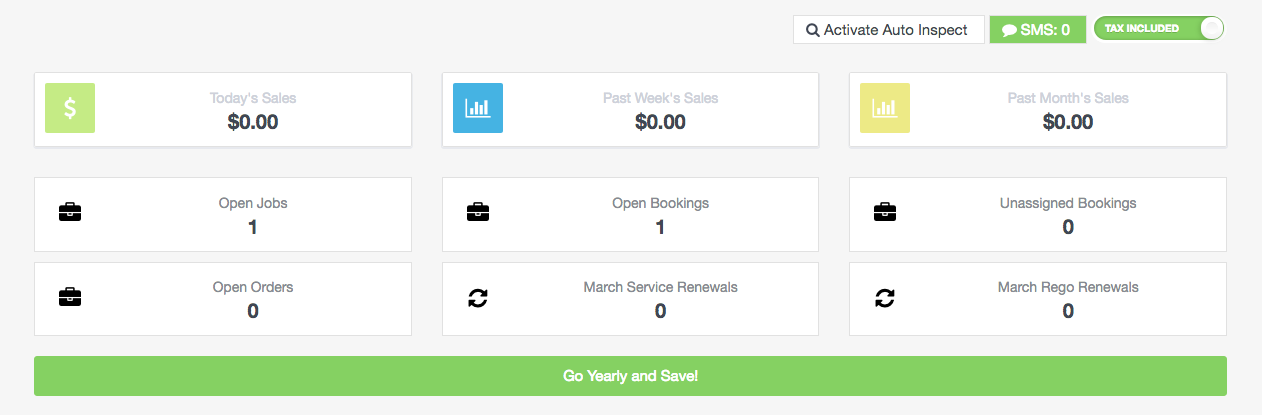 Simply click on the green banner to "Go yearly and Save!"
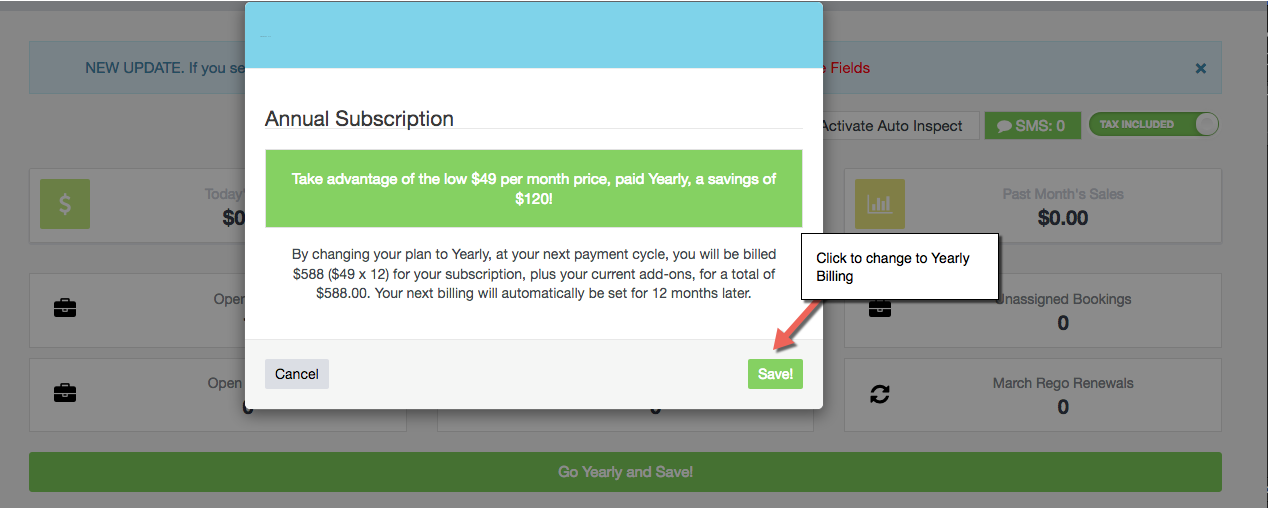 The change take effect immediately and charges will be made to your current payment method attached to your account. Your new billing cycle will 12 months from your next payment date.
Alternatively, if you would like to discuss your account options feel free to get in touch with your account manager on 1300 729 658 or email support@workshopsoftware.com
The change take effect immediately and charges will be made to your current payment method attached to your account. Your new billing cycle will 12 months from your next payment date.
Alternatively, if you would like to discuss your account options feel free to get in touch with your account manager on 1300 729 658 or email support@workshopsoftware.com
Related Articles
- Access and change your subscription details
- Change Log and Feature Request
- How to change your password
