 Skip to content
This article explains how to switch on the Workshop API, generate the credentials your developer or a third-party app need to connect and where to find the API documentation.
Please note: The Workshop API is available on the Platinum subscription only and only Admin users can see and manage it. If you're on Platinum and an Admin, you'll find it under CRM Tools > API.
Turn on the Workshop API and get your Credentials
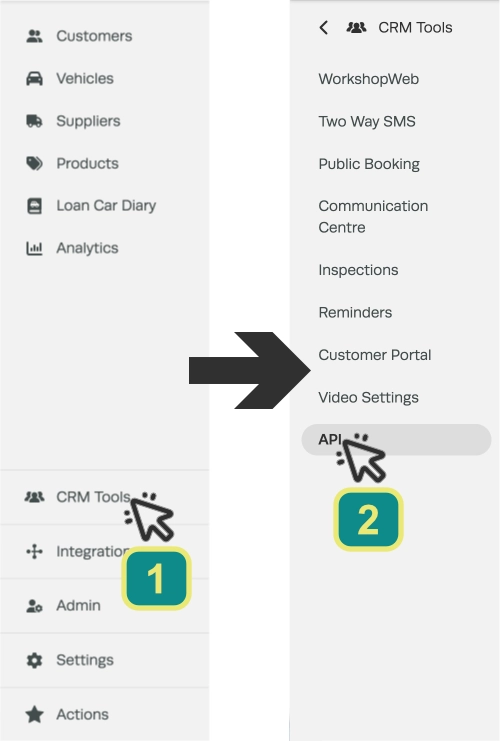
- In the left hand sidebar menu click CRM Tools (1) then select API (2).
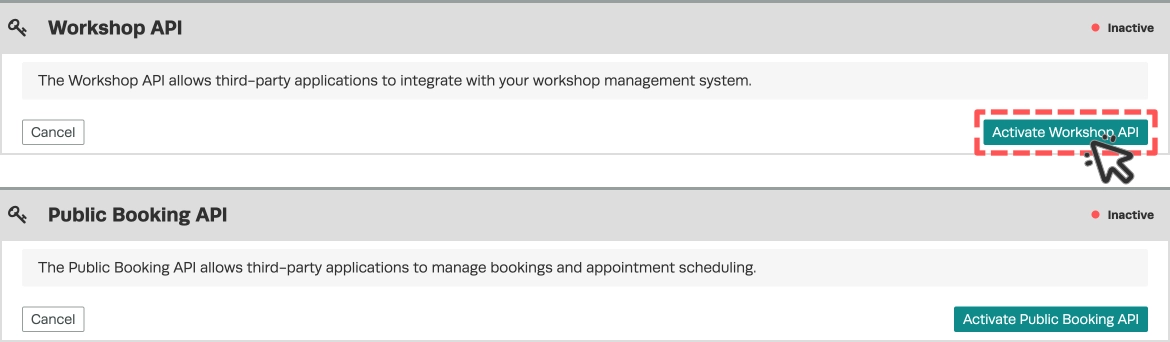
You will see two cards: Workshop API and Public Booking API.
- On the Workshop API card, click Activate Workshop API and confirm. The card switches to Active and your first set of credentials is generated automatically.
- A pop-up titled API Keys shows your API Key, API Secret and Company ID. Click each entry to copy to your clipboard and store all three somewhere safe.
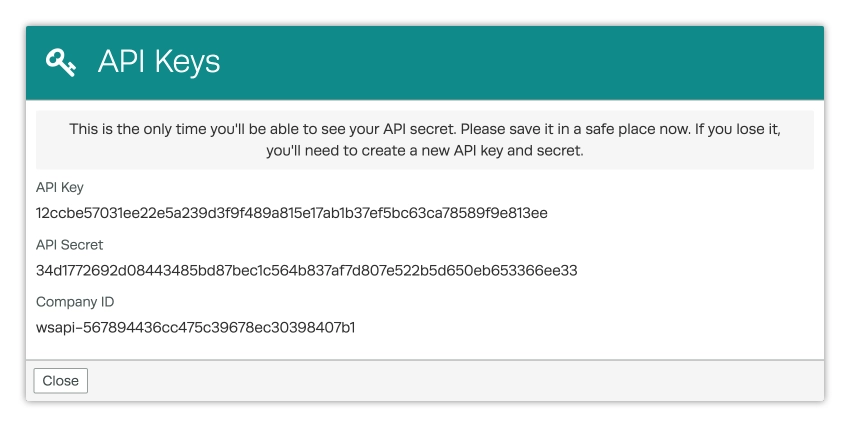
Important: Your API Secret is shown only once, right after it's created. If you close the pop-up without saving it you will have to generate a new key and secret to get a new one.
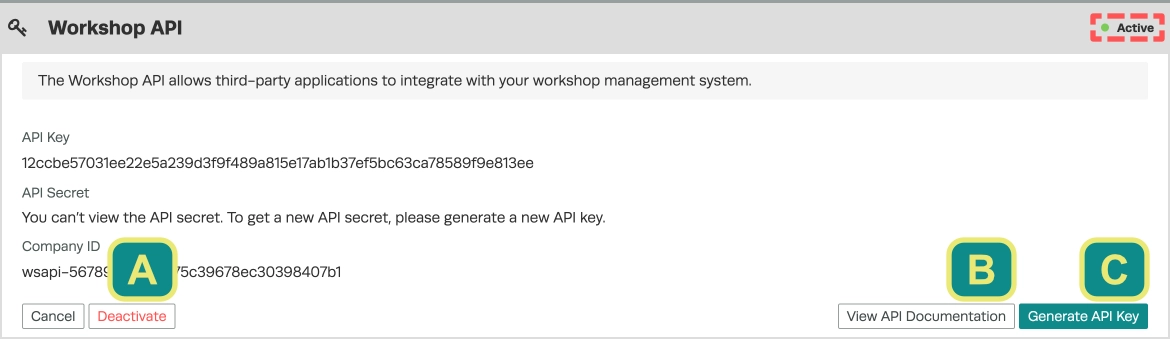
- Give the API Key, API Secret, and Company ID to your developer or the app you're connecting. Click View API Documentation (B) on the card to open the full Workshop API reference - it lists every available request and field.
Your Workshop API is now Active.
Managing your credentials
Generate a new key: On the Workshop API card, click Generate API Key (C) to replace your key and secret. The old key and secret stop working immediately, so update any connected app with the new values.
Turn off the API: Click Deactivate (A) to switch the Workshop API off.
Please note: After the credentials are first created the card never shows your API Secret again - you'll only see the message "You can't view the API secret. To get a new API secret, please generate a new API key." Your API Key and Company ID stay on the card so you can copy them again any time.
Good to Know
- If your subscription drops below Platinum, your Workshop API credentials are cleared automatically the next time you log in and the API stops working until you're back on Platinum.
- The Public Booking API card sits on the same page and works the same way - activate, generate, copy. See the Public Booking API credentials article for the specifics of this API.
- Partners such as Podium that pull your data on your behalf connect through a separate path found in the Integrations > Podium page, not the Workshop API card. That path is available to Gold users as well as Platinum.
Please Note: Podium AI booking functionality requires a Platinum subscription as External Booking functions are only accessible from a Platinum Account.
Frequently Asked Questions
I'm on Platinum but I can't see the API menu - why?
The API menu only appears for Admin users on a Platinum subscription. If you are an Admin user and still cannot see it check your subscription level. If you are not an Admin, ask an Admin at your workshop to set it up or to update your user permissions.
I used to find my API settings under Marketing Integrations - where did they go?
API access has moved. Your own direct API credentials now live under CRM Tools > API and the Podium partner integration now has its own page under Integrations > Podium.
What's the difference between the Workshop API and Podium?
The Workshop API gives your own developer or app direct access to your workshop's data and is Platinum only. Podium is a partner integration that connects on your behalf and is available from Gold up. They use separate credentials and separate pages.
I lost my API Secret - can I look it up?
No. The secret is only shown once, at the moment it's created and can't be viewed again. Click Generate API Key to create a new key and secret then update your connected app with the new values.
Do I have to build the integration myself?
The Workshop API is aimed at developers. If you're not building it yourself, pass your credentials and the View API Documentation link to whoever is doing your integration.
