Skip to content

Once a customer has approved a quote, you may create a Booking from it to schedule the work, the Booking inherits the Quote's details.
Create the Booking
- Open the Quote you want to create a Booking from, if you need to create a Quote first, see How to Create a Quote.
- Click the Star icon in the top right hand corner of the Customer Invoice card and select Create Booking.
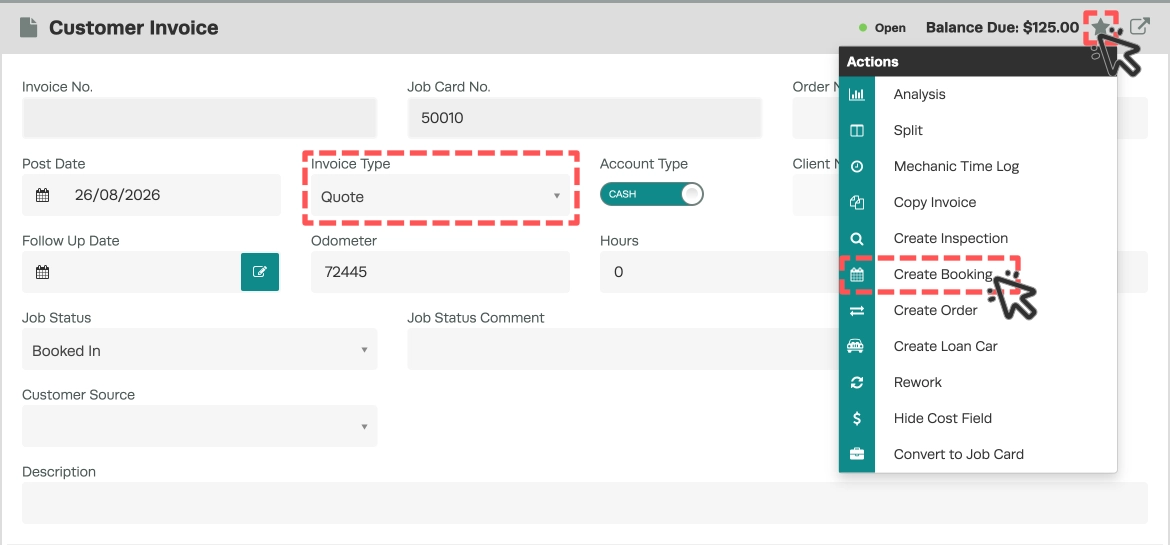
- The Booking opens on the Booking details page. It inherits the Quote's Customer and Vehicle details and all of the Quote's line items, including Labour lines.
Set the Booking Date
Bookings made from outside the Booking Diary default to today's date, so remember to change the Booking Date.
- On the Booking details page, change the Booking Date field, then click Save. Any Labour lines update their times as you change the date. The Booking is then placed in your Booking Diary.

Please note: A Labour product line must be included in the Booking for it to appear in the Booking Diary. Labour lines on the Quote are copied to the Booking, but if the Quote has none add one to the Booking.
Book it into the Diary
A Booking created from a Quote has only its Booking Date set, so it waits to be assigned to a Mechanic.
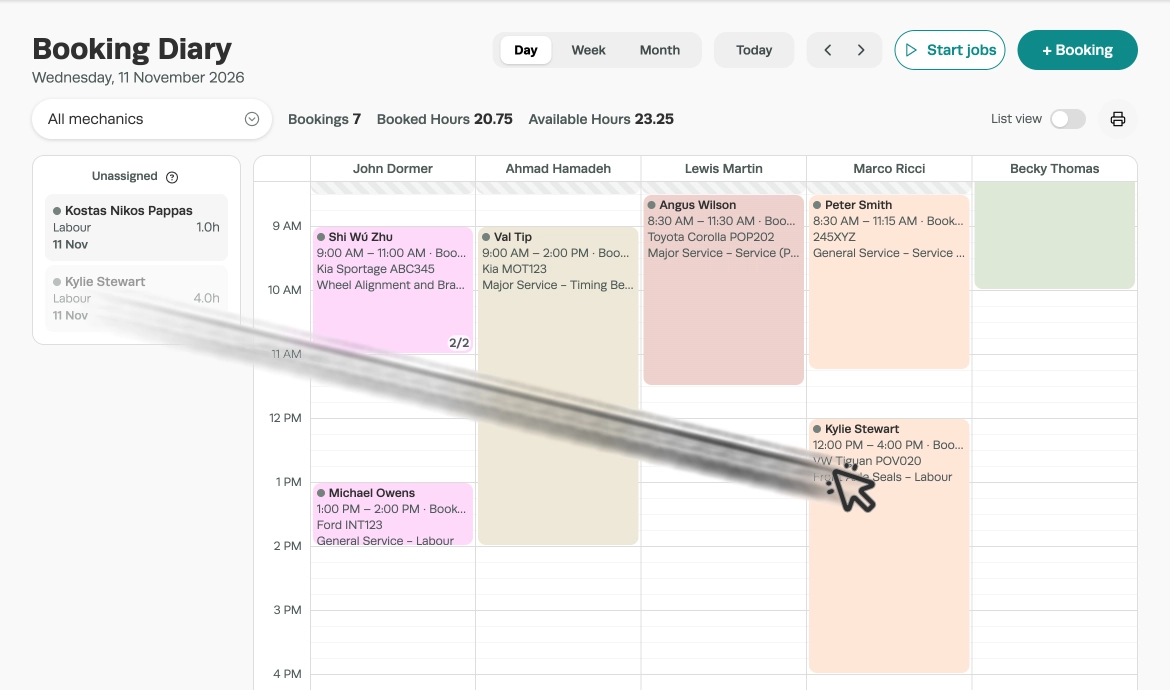
- In the Booking Diary's Day view, the Unassigned column on the left holds work waiting for a Mechanic or time.
- Drag the card onto a Mechanic's column at the time you want. It is booked there straight away.
To assign a Mechanic another way, see Assign a Mechanic to a Booking.
Good to Know
- The Booking inherits the Quote's Customer, Vehicle and all line items, including Labour lines.
- The Quote is not converted or changed, and there is no formal link between the Quote and the Booking.
- The original Quote stays in the system for reference.
- Once saved, the Booking appears in the Booking Diary so you can schedule the work.
Frequently Asked Questions
Will the Quote be deleted after creating a Booking?
No. The Quote stays in the system as it was. The Booking is a separate record that inherits its details, with no formal link between them.
Can I change a Booking back to a Quote?
No. A Booking can't be changed back to a Quote. The original Quote stays in the system, so you can use it again if you need to.
Related Articles
- How to Create a Booking in Workshop Software
- How to Create a Quote
- Assign a Mechanic to a Booking
- Using the Booking Diary